Server configuration
This page applies if you are installing Mixpost manually or into an existing Laravel app. The steps are the same for Lite, Pro and Enterprise.
If you install with Docker, the image already ships with everything below configured and none of it is necessary.
Requirements
Software
| Component | Version | Required | What it is for |
|---|---|---|---|
| PHP | >= 8.3.0 | Yes | Runs the application. |
| MySQL or MariaDB | — | Yes | Stores your posts, accounts and media records. |
| Redis | >= 6.2 | Yes | Backs the queue that publishes your posts, through Horizon. |
| Web server with URL rewriting | — | Yes | Nginx, or Apache with mod_rewrite. |
| Supervisor | — | Yes | Keeps the Horizon queue worker running. |
| Cron | — | Yes | Runs the scheduler every minute, which is what publishes scheduled posts on time. |
| Composer | — | Yes | Installs the application's dependencies. |
| Curl, Zip, Unzip | — | Yes | Used during installation and updates. |
| FFmpeg | — | Optional | Generates video thumbnails. Without it, videos upload fine but get no thumbnail. |
| libvips, libheif, libde265 | see below | Optional | Converts HEIC/HEIF photos from iPhones and iPads. Without them, those uploads fail. |
Redis and Supervisor are not optional even for a single-user instance: publishing runs through the queue, so a post is only ever sent by a worker that Supervisor keeps alive.
PHP extensions
- php-curl
- php-mysql
- php-bcmath
- php-gd
- php-mbstring
- php-redis
- php-xml
- php-zip
- php-intl
Mixpost also needs dom and fileinfo. On Debian and Ubuntu both come with the packages above —
dom ships inside php-xml, and fileinfo is compiled into PHP itself — so there is nothing extra
to install. On managed hosting they are sometimes switched off, which is worth checking if
installation fails on a platform you do not control.
In Plesk, you can install or upgrade PHP via Tools & Settings → Plesk → Updates.
Install the required software
On Ubuntu or Debian, this single command installs the PHP extensions, Redis and Supervisor together.
Replace 8.3 with your PHP version if it is newer.
sudo apt update
sudo apt install -y \
  php8.3-curl php8.3-mysql php8.3-bcmath php8.3-gd php8.3-mbstring \
  php8.3-redis php8.3-xml php8.3-zip php8.3-intl \
  redis-server supervisor \
  curl zip unzip cron
Composer is installed separately — the version in the distribution's repositories is often behind, so follow the official instructions.
Redis
The command above installs and starts Redis. Mixpost needs 6.2 or higher; check what you got with
redis-server --version.
Supervisor
Supervisor is installed by the command above, but it still needs to be told what to run. That configuration is part of the installation guide, in the Application Process Management step — follow it after the application itself is in place.
FFmpeg (optional)
Mixpost generates a thumbnail image from a video while the video file is being uploaded. That needs FFmpeg on your server.
sudo apt install -y ffmpeg
Skipping it is safe: videos still upload and publish, they simply have no thumbnail. The System Status page reports whether Mixpost can find FFmpeg.
HEIC/HEIF support (optional)
Mixpost uses libvips to convert HEIC/HEIF photos — the format iPhones and iPads produce by default — to JPEG. Without it, those uploads are rejected.
It needs libvips >= 8.15.1, libheif >= 1.19.8 and libde265:
sudo add-apt-repository ppa:strukturag/libheif
sudo apt update
sudo apt install -y libvips42t64 libheif1 libde265-0
libvips is reached through PHP's FFI, which also has to be enabled — see Enable FFI below.
Configure PHP
The settings below live in php.ini. Which file that is depends on how PHP runs:
# Apache
/etc/php/VERSION/apache2/php.ini

# PHP-FPM
/etc/php/VERSION/fpm/php.ini
Replace VERSION with your PHP version (for example 8.3). Restart PHP after editing:
# PHP-FPM
sudo systemctl restart phpVERSION-fpm.service

# Apache
sudo systemctl restart apache2
Enable the pcntl functions
PHP disables some functions by default for security reasons, and hosting panels often disable more.
Horizon needs pcntl_signal and pcntl_alarm to manage its workers — they are how it restarts a
worker cleanly and enforces job timeouts. With them blocked, the queue behaves unpredictably: workers
ignore restarts and keep running stale code after an update.
Remove them from the disable_functions directive.
Before:
disable_functions = pcntl_alarm, pcntl_signal, exec, shell_exec
After:
disable_functions = exec, shell_exec
Memory limit
Image and video processing are the heaviest thing Mixpost does. Give PHP room for it:
memory_limit = 512M
Upload limits
Files larger than MIXPOST_CHUNKED_UPLOAD_THRESHOLD (default 10 MB) are uploaded in chunks of
MIXPOST_CHUNKED_UPLOAD_SIZE (default 10 MB, maximum 64 MB), so your server only needs to handle a
single chunk, not the full file. A 200 MB video still arrives as 10 MB requests.
This means your server limits must be at least the larger of those two values, plus some headroom. If you raise either variable, raise these limits to match:
MIXPOST_CHUNKED_UPLOAD_SIZE | upload_max_filesize | post_max_size, client_max_body_size, LimitRequestBody |
|---|---|---|
| 10 MB (default) | 12 MB | 13 MB |
| 32 MB | 36 MB | 37 MB |
| 64 MB (maximum) | 70 MB | 71 MB |
upload_max_filesize limits only the file part of the request, while the other three limit the
entire request body — the chunk plus the multipart boundaries and form fields — which is why they sit
one step higher.
For the 10 MB defaults:
upload_max_filesize = 12M
post_max_size = 13M
The web server has its own limit to match; it is set alongside the document root in Configure the web server.
Both variables are documented under Upload File Size Limits.
Server-level limits take precedence over Mixpost's settings. If PHP or your web server rejects a
request that is smaller than the chunk size, uploads fail regardless of MIXPOST_MAX_VIDEO_FILE_SIZE
or MIXPOST_MAX_IMAGE_FILE_SIZE.
Enable FFI (HEIC/HEIF only)
Skip this unless you installed HEIC/HEIF support. libvips is reached through FFI, which is off by default:
[FFI]
ffi.enable = true
zend.max_allowed_stack_size = -1
Restart both your web server and PHP-FPM afterwards.
Configure the web server
Point the document root directly at the public directory inside your Mixpost installation folder.
Mixpost must be installed on a primary domain or a subdomain. Installation in a subdirectory is not supported and will result in operational issues:
example.com— validmixpost.example.com— validmixpost.test— validexample.com/mixpost— invalidlocalhost/mixpost— invalid
Each configuration below sets the document root and the request-size limit from the upload limits table, so there is one place to edit per server.
Nginx
server {
    listen 80;
    root /var/www/path-to-your-project/public;
    index index.php index.html;

    # Must match post_max_size — see the upload limits table
    client_max_body_size 13M;

    # Additional Nginx configuration goes here
}
sudo systemctl restart nginx
Apache
<VirtualHost *:80>
    ServerAdmin webmaster@yourdomain.com
    DocumentRoot "/var/www/path-to-your-project/public"
    ServerName yourdomain.com
    ServerAlias www.yourdomain.com

    <Directory "/var/www/path-to-your-project/public">
        Options Indexes FollowSymLinks
        AllowOverride All
        Require all granted
    </Directory>

    # Must match post_max_size — see the upload limits table.
    # LimitRequestBody is in bytes: 13631488 is 13 MB.
    LimitRequestBody 13631488

    # Additional Apache configuration goes here
</VirtualHost>
LimitRequestBody can also be set globally in /etc/apache2/apache2.conf.
sudo systemctl restart apache2
Plesk
Access your Plesk panel, navigate to Hosting settings and update the Document Root to point to
the public folder.
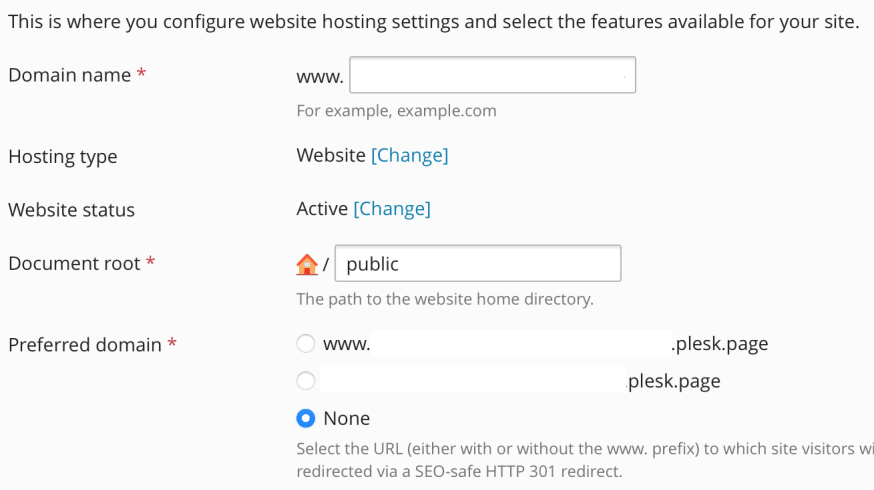
PHP settings are under PHP Settings, and the request-size limit under Apache & nginx Settings.
Verify
Once the application is installed, Mixpost can check most of this for you. In Pro and
Enterprise, open the Admin Console → Status page. It reports your PHP, MySQL and Horizon
versions, whether Horizon is running, whether the queue connection is configured, when the scheduler
last ran, your upload_max_filesize and post_max_size, and whether GD and FFmpeg were found.
The status page is not available in Lite. From the command line, on any edition:
php -v                                                  # 8.3 or higher
php -m | grep -E 'curl|mysqli|bcmath|gd|mbstring|redis|xml|zip|intl|dom|fileinfo'
php -r "var_dump(function_exists('pcntl_signal'));"     # must be true
php -i | grep -E 'memory_limit|upload_max_filesize|post_max_size'
redis-server --version                                  # 6.2 or higher
redis-cli ping                                          # PONG
supervisorctl status                                    # your Horizon program, RUNNING
ffmpeg -version                                         # only if you installed it
If something here does not line up, Troubleshooting covers the failures these settings usually cause.